
rpic renders diagrams written in Brian Kernighan’s pic picture-drawing language: you describe a drawing by walking around a plane dropping primitives — boxes, circles, lines, arrows — with relative positioning doing the layout for you. The engine is pure Rust (no troff, no LaTeX, no system dependencies) and outputs SVG, PNG and PDF.
All diagrams in this vignette were pre-rendered with
rpic_svg() — the code chunks show exactly the source that
produced each figure. The full language reference, extension pages and a
live playground are at rpic.dev.
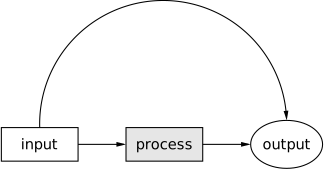
A first picture
Primitives placed in sequence flow in the current direction (right,
by default); arrow connects them; arc bends
between named positions:
library(rpic)

svg <- rpic_svg('
boxht = 0.35; boxwid = 0.8
A: box "input"
arrow
box "process" fill 0.9
arrow
E: ellipse "output"
arc cw -> from A.n to E.n
')
Positioning
Objects can be labelled (A:), addressed by compass
corners (.n, .e, .c, …) or by
ordinals (last circle, 2nd box), and placed
with expressions — including fractions of the way between two
points:
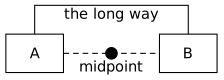
rpic_svg('
A: box "A" wid 0.6 ht 0.4
B: box "B" wid 0.6 ht 0.4 at A + (1.6, 0)
line dashed from A.e to B.w
circle rad 0.06 fill 0 at 1/2 between A.e and B.w
"midpoint" at last circle.s below
arrow from A.n up 0.3 then right 1.6 then down 0.3 to B.n
"the long way" at 1/2 between A.n and B.n + (0, 0.42)
')
Programmability
pic is a little language: for/if,
variables, define macros with $1…$9, and
sprintf are all built in:
rpic_svg('
for i = 0 to 5 do {
  circle rad 0.12 fill i/6 at (i * 0.4, 0)
}
')
TeX math labels
With texlabels = TRUE (or texlabels = 1 in
the source), a label written entirely as $…$ is typeset as
TeX math, natively — KaTeX-grade quality with exact metrics, so boxes
fit around formulas correctly. Write TeX commands with a
single backslash in the pic source (escaped as \\ inside an
R string):
rpic_svg('
box "$\\frac{1}{2\\pi}\\int_{-\\infty}^{\\infty} f(t)\\,e^{-i\\omega t}\\,dt$" fit
', texlabels = TRUE)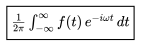
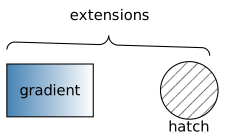
rpic extensions
Beyond classic pic, opt-in extensions cover linear
gradient fills, hatch patterns, curly
brace annotations, margin, fit,
opacity, layers (behind) and more — each
documented with live examples at rpic.dev. They are
inert for classic input:
rpic_svg('
B: box wid 0.9 ht 0.55 gradient "steelblue" "white"
"gradient" at B.c
C: circle rad 0.3 hatch hatchangle 45 at B.e + (1.0, 0)
"hatch" at C.s below
brace from B.nw + (0, 0.15) to C.ne + (0, 0.15) up "extensions"
')
Errors you can point at
Compile failures raise a classed rpic_error condition
whose info field carries the structured diagnostic —
position (always relative to your source), kind, and a
did-you-mean hint:
Where next
-
vignette("circuits")— the native circuit-element library; -
vignette("class-and-animate")— CSS class hooks and the animation manifest; -
rpic_register_knitr()— write pic directly in R Markdown / Quarto chunks; - rpic.dev — the full language documentation.